


 VDJ Home
 Downloads
 Purchase VDJ
 Technical Support
 MyDjSongbook
 Screenshots
VDJ Home
Welcome to Next Generation Software's web site for Virtual DJ Studio, our full-featured DJ, Karaoke and Video system.
What's New
|
Download Now
|
Purchase Options
See the Purchase Page for Details, or the Download Page for a Free Trial!
Click for Screenshots
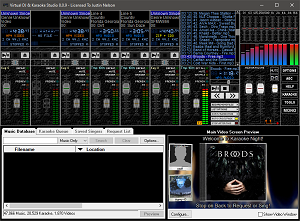
Virtual DJ Studio supports MP3+CDG Karaoke, as well as ZIP and most audio and
video file formats.
See the Purchase Page for Details, or the Download Page for a Free Trial!
Click for Screenshots
With a license, you can also sign up to utilize our exclusive Online Songbook & Request App with separate monthly subscription. Click Here for more information.
Virtual DJ Studio can be purchased for only $99.95 (Limited time, Save $20). See below for the various purchasing methods available. You will receive a License Key that unlocks VDJ for full commercial use.
How to Get Virtual DJ Studio
Purchase for only $99.95 |
Download Free Evaluation from VDJ.Net |
|

Full License in Seconds! |
Download Free Trial Version |
You can also download a Free Trial with no obligation. You can try VDJ for free for 14 days and determine if it meets your needs. If at any time you wish to fully unlock your VDJ, simply purchase a license key. If you decide VDJ is not for you, there is no obligation and you can uninstall the program at any time.
Certified 100% Spyware & Adware Free
Compatible with Windows 11 / 10 / 8.1 / 8 / 7
Compatible with Windows 11 / 10 / 8.1 / 8 / 7
If you have a license to an older version, Click Here for downloads.
Feature-Filled DJ Software
Virtual DJ Studio is not like all of the other DJ programs out there. While other programs limit you to two players with a Cross-Fader, Virtual DJ Studio provides you with an entire studio.Video Playback allows you to mix Video and Music files (as well as Karaoke) seamlessly. You can even specify a Video as your background - CDG lyrics will appear over top of a looping video or even an attached webcam! The Background (whether it's a Video, Camera, or a still image) darkens as the CDG lyrics come up.
Exclusive customer song request app make Virtual DJ Studio stand out above the rest! Click here for more details about this exclusive feature.
Virtual DJ Studio gives you a mixer-board interface. Each line offers things you would expect from a typical mixer -- volume fader, mute, crossfader assignment, etc. Additionally, each line contains an MP3/WAV/Karaoke player, with all of the controls you might expect -- including a Pitch/Tempo control. If you have two or more sound cards/audio devices, you can route any line to your secondary device, for headphone preview or beat-matching. Alternatively, you might use this feature to simply allow more control with your external mixer.
Playlist Support
You can load up a playlist full of music, set the Auto-Crossfade button, and simply let VDJ mix your music.
Full Karaoke Support
The days of hunting down a Karaoke CD, finding the right track, and having only one or two singers queue'd up are gone! With a Laptop, you can replace not only your CD players; you can eliminate the need for cases of CDs, and take up less space than you ever imagined!Supported Karaoke Formats
You can either play an MP3 that has a corresponding .CDG file, or you can play directly from a ZIP file. VDJ does this directly, with no need to create temporary files (like most other programs do). VDJ is the only Karaoke system that lets you seek while directly playing a ZIP or MP3 file, without ever losing sync!No other Karaoke package delivers this many features.
Singers List
Even though VDJ looks different from other Karaoke programs, it still contains a Singer's List feature. When enabled, you can queue up any number of songs, along with the name of the person who wishes to sing it. From there, you can drag a song into a line in VDJ, or simply double-click to launch the file in the first line. VDJ will also display a list of singers/songs in the CDG window when no karaoke file is being played (for example, if your CDG window is connected to a second monitor, television, or multiple TVs, your patrons will know who's up next, and when their song will be up).Easy to Use
Don't be intimidated by the number of buttons you see in the picture. If you have a knack for audio equipment, you will quickly pick up on VDJs use. VDJ comes with a complete Help file, including a Getting Started guide that will have you mixing MP3s in no time!Headphone Support
VDJ allows you to use an extra sound card for CUEing, or Previewing, a sound file. You can use this feature to assist with beat-mixing (fading two songs together on-beat), or for simply previewing a song before playing it live. Many DJs use their laptop's built-in sound for previewing (since the quality of the internal sound chip is often lacking), and an external USB audio device for their main mix. This configuration allows you the flexibility you are used to with dual CD decks and an external mixer; just like a real mixer, enabling the CUE button routes that line to the headphone output (eg, to your Secondary Sound Card).So how much will all of this cost?
Virtual DJ Studio is available for only $99.95 for a limited time. Unlike most other software, VDJ can be used on up to two separate PCs owned by the licensee. We recognize that many DJs have a desktop system as well as a mobile rig; our license allows you to use VDJ on both systems (up to two computers) without fear of violating the license agreement, as long as both PCs are owned by the licensee (and are not used for commercial purposes at the same time).If you are considering purchasing Virtual DJ Studio, we strongly encourage you to try out our free trial version first, so that you can make an informed decision. We do NOT want you to purchase our product only to find that it does not suit your particular needs. By taking advantage of our free 30-day trial, you are making sure that our product is everything you expect it to be. This avoids wasting both our time and yours, as well as keeping costs low (refunds cost money!)
Try before you buy is our motto. If the trial version provides what you need, you have a full 30 days to make a purchase decision. If not, nothing is lost and no harm is done (our software is guaranteed to be free of ad-ware, spyware, and viruses).