Getting Started with Virtual DJ Studio
When you first launch Virtual DJ Studio using the Default Configuration, you
are presented with three main Application Windows. We will start with the Main Interface:
Main Window:
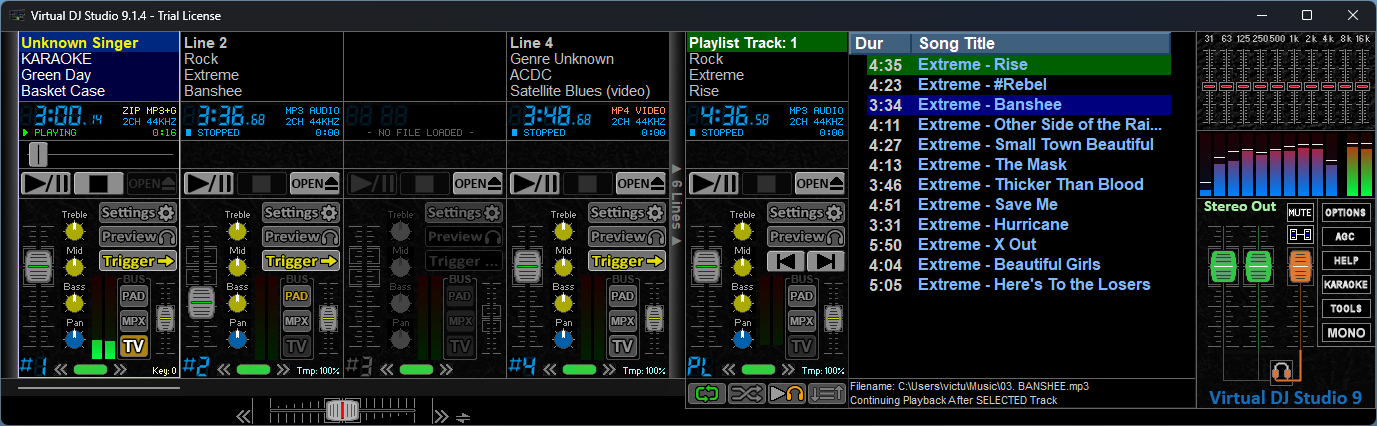
The Main Window contains your Player Lines, the Playlist Player, and the Main
Output and Controls area. The arrangement is highly-configurable, but for
now we will assume you are using the Default layout.
First, I recommend
Indexing
your Media Folders. Once you get that started, become familiar with the
Player
Line Interface.
Soon we'll break down the Playlist Player -- though it shares many of the same
buttons and features as the Player Line. Then we'll get to the Main
Ouput and Controls.
Search & Request Window
This area will describe the various tabs and functions of the
Search &
Requests window, with detailed pages for each
Tab.
Video Preview Window
Formerly called the Karaoke Preview, or CDG Preview window, the
Video Preview window lets you see what is going out on the main Video screen, if enabled.
It also offers many functions and settings related to Karaoke and Video playback
on your main Video Screen (usually your "Secondary Monitor", or a connected
Television (or multiple Televisions in a Matrix or Distribution system).
Much more coming!
Start with the
Player
Line Interface for now, as that will get you familiar with how the Players
themselves work; these will likely be what you interact with the most...
How-To Videos
We will also be creating How-To videos to compliment the online documentation.
Keep checking back, as we're working through October 2026 to get the documentation
completed, and hopefully get started on the Videos as well.


 VDJ Home
 Downloads
 License VDJ 9
 Support / How-To
 What's New?